DISCLOSURE: Movie Studio Zen is supported by its audience. When you purchase through links on this site, we may earn an affiliate commission.
Solved Computer advice when sticking with 1920x1080 50p
- Eagle eye.
-
 Offline Topic Author
 - Zen Level 4
-

- Posts: 137
- Thank you received: 35
Computer advice when sticking with 1920x1080 50p was created by Eagle eye.
Posted 19 Aug 2015 13:02 #1 Hi Dereck, just an enquiry on computer spec’s. I run a Win 7 64bit PC with 8G RAM and an Intel i7-3770K cpu ( Never overclocked), Corsair 650 watt power supply & I also have an Nvidia GTX760 spec video card and my ‘C’ drive is a Samsung Pro SSD. Rendered video is to a WD Black 7200rpm 500G HDD.
Recently I took some 1920x1080 50p footage in several clips. I customised AVC/AAC Internet 1080p template to be 50fps renamed it and saved.
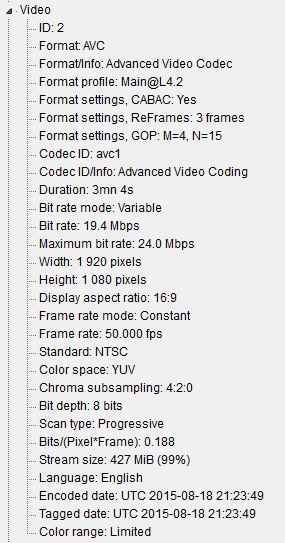
The video took my setup 10min 37sec to render 3mins of footage. The MSP edited video image on my 65” 4K TV via my WD Passport HDD was the best I have seen from my HXR-NX70P camera. I am happy to continue with this quality format and not bother with the extra expense of 4K. However I would like to lower render times and of course one day burn this MP4 to Blu-ray. Can you suggest any changes to my setup that you see would help achieve that outcome. I have included a frame grab and the video properties in the attachments below.
Recently I took some 1920x1080 50p footage in several clips. I customised AVC/AAC Internet 1080p template to be 50fps renamed it and saved.
The video took my setup 10min 37sec to render 3mins of footage. The MSP edited video image on my 65” 4K TV via my WD Passport HDD was the best I have seen from my HXR-NX70P camera. I am happy to continue with this quality format and not bother with the extra expense of 4K. However I would like to lower render times and of course one day burn this MP4 to Blu-ray. Can you suggest any changes to my setup that you see would help achieve that outcome. I have included a frame grab and the video properties in the attachments below.
by Eagle eye.

Please Log in or Create an account to join the conversation.


Replied by DoctorZen on topic Computer advice when sticking with 1920x1080 50p
Posted 19 Aug 2015 13:48 #2 Hi Eagle Eye
I am into week 2 of being on Windows 10 after doing a clean install of the new operating system.
So I have been doing a lot of test renders with all the different formats.
What I can see quite clearly is that Mainconcept AVC/AAC with the Encode Mode set to CPU only is very slow, even with my i7-2600k over-clocked to 4.3 GHz.
From what I have learnt on the Creative Cow Sony Vegas Forum, Sony uses the default Mainconcept Encoder which is quite old now and has not been updated by the owners of this codec. Which means it is not taking advantage of the newest hardware architectures. So there is no way to speed this up on your system.
If you had an older Nvidia GTX500 or GTX400 Series Graphics Card (like I do), you could set the Encoder to CUDA and see very fast rendering times. Unfortunately Nvidia GTX600 Series and above use a different architecture which no longer works with the out of date Mainconcept Encoder.
You could also experiment with Sony AVC/MVC and see if your computer supports Intel Quick Sync. Your CPU has Intel Integrated HD Graphics, but it depends on what type of Motherboard Chipset you have, as to whether Quicksync will work. Open the Encode list and you will see it listed. Many people report that Intel Quicksync is faster at rendering than the CPU or Graphics Card.
If you have Movie Studio Platinum 13 or Sony Vegas Pro 13, you could experiment with the XAVC format, which supports 25p, 50p and 4K video.
This is a high quality / high bit rate codec and it renders faster than Mainconcept AVC/AAC on my computer.
Regards
Derek.
I am into week 2 of being on Windows 10 after doing a clean install of the new operating system.
So I have been doing a lot of test renders with all the different formats.
What I can see quite clearly is that Mainconcept AVC/AAC with the Encode Mode set to CPU only is very slow, even with my i7-2600k over-clocked to 4.3 GHz.
From what I have learnt on the Creative Cow Sony Vegas Forum, Sony uses the default Mainconcept Encoder which is quite old now and has not been updated by the owners of this codec. Which means it is not taking advantage of the newest hardware architectures. So there is no way to speed this up on your system.
If you had an older Nvidia GTX500 or GTX400 Series Graphics Card (like I do), you could set the Encoder to CUDA and see very fast rendering times. Unfortunately Nvidia GTX600 Series and above use a different architecture which no longer works with the out of date Mainconcept Encoder.
You could also experiment with Sony AVC/MVC and see if your computer supports Intel Quick Sync. Your CPU has Intel Integrated HD Graphics, but it depends on what type of Motherboard Chipset you have, as to whether Quicksync will work. Open the Encode list and you will see it listed. Many people report that Intel Quicksync is faster at rendering than the CPU or Graphics Card.
If you have Movie Studio Platinum 13 or Sony Vegas Pro 13, you could experiment with the XAVC format, which supports 25p, 50p and 4K video.
This is a high quality / high bit rate codec and it renders faster than Mainconcept AVC/AAC on my computer.
Regards
Derek.
ℹ️ Remember to turn everything off at least once a week, including your brain, then sit somewhere quiet and just chill out.
Unplugging is the best way to find solutions to your problems. If you would like to share some love, post a customer testimonial or make a donation.
Unplugging is the best way to find solutions to your problems. If you would like to share some love, post a customer testimonial or make a donation.
by DoctorZen
The following user(s) said Thank You: billr, Eagle eye.
Please Log in or Create an account to join the conversation.
- Eagle eye.
- Offline Topic Author
- Zen Level 4
-
- Posts: 137
- Thank you received: 35
Replied by Eagle eye. on topic Computer advice when sticking with 1920x1080 50p
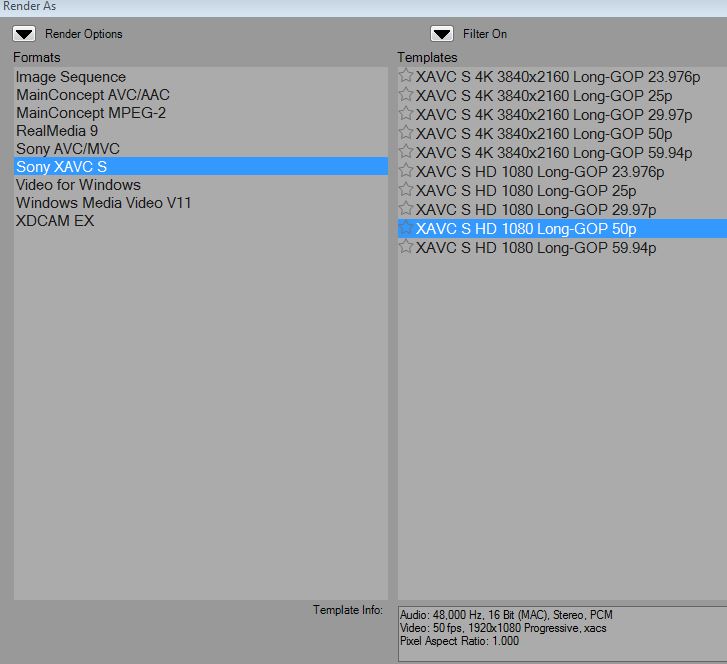
Posted 19 Aug 2015 15:14 #3 Thanks for your interesting reply. With reference to trying other codec's, I actually successfully used the xavcs codec as shown in the attachment and rendered with it the same 50p footage and it completed in only 5min 56 secs. . However when I played it out of my WD Passport drive the image although very sharp jerked seeming like it was showing it frame by frame when panning. I don't understand what is meant by 'long GOP' but I guess that may be the problem? 
by Eagle eye.
Please Log in or Create an account to join the conversation.
Replied by DoctorZen on topic Computer advice when sticking with 1920x1080 50p
Posted 19 Aug 2015 16:43 #4 Long GOP = Long Group of Pictures
Read about it here:
www.redsharknews.com/technology/item/2080-ten-reasons-to-like-sony-s-pro-video-format,-xavc?page=1
The jerky movement may mean that the Data Rate coming from the WD Passport Drive to your display device (TV ?) is not sufficient enough for real time playback, with the larger XAVC-S files.
If the WD Passport Drive is only connected via USB 2.0, that could explain it. The drive itself is probably only spinning at 5400 rpm, instead of the faster 7200 rpm which is another factor.
USB 3.0 (blue connector ends) can transfer much faster and keep up with streaming of large files.
USB 2.0 is very old tech now and most new computers and devices now only use USB 3.0
Read about it here:
www.redsharknews.com/technology/item/2080-ten-reasons-to-like-sony-s-pro-video-format,-xavc?page=1
The jerky movement may mean that the Data Rate coming from the WD Passport Drive to your display device (TV ?) is not sufficient enough for real time playback, with the larger XAVC-S files.
If the WD Passport Drive is only connected via USB 2.0, that could explain it. The drive itself is probably only spinning at 5400 rpm, instead of the faster 7200 rpm which is another factor.
USB 3.0 (blue connector ends) can transfer much faster and keep up with streaming of large files.
USB 2.0 is very old tech now and most new computers and devices now only use USB 3.0
ℹ️ Remember to turn everything off at least once a week, including your brain, then sit somewhere quiet and just chill out.
Unplugging is the best way to find solutions to your problems. If you would like to share some love, post a customer testimonial or make a donation.
Unplugging is the best way to find solutions to your problems. If you would like to share some love, post a customer testimonial or make a donation.
by DoctorZen
The following user(s) said Thank You: Eagle eye.
Please Log in or Create an account to join the conversation.
- Eagle eye.
- Offline Topic Author
- Zen Level 4
-
- Posts: 137
- Thank you received: 35
Replied by Eagle eye. on topic Computer advice when sticking with 1920x1080 50p
Posted 20 Aug 2015 06:43 #5 As usual you seem to be correct. I even tried putting the XAVCS MP4 footage onto a flash drive (fast USB 3) and plugging it into the TV but loss of coherent sound and jerky picture remained. I guess the TV although only a year old SONY 4K TV can't hack it. My HXR-NX70p produces AVCHD as a .MTS file and I was wondering is this OK to encode as XAVCS MP4 and could it be burned to a current Blu-ray spec disck or am I jumping the gun as usual. That Redshark site was very interesting also, thanks. 
Last Edit:20 Aug 2015 06:59 by Eagle eye.
Please Log in or Create an account to join the conversation.
Replied by DoctorZen on topic Computer advice when sticking with 1920x1080 50p
Posted 20 Aug 2015 16:01 #6 To be honest I don't know what is going on.
Your Sony 4K TV should be able to play XAVC S video.
I know there are a few people on the Sony Creative Software Vegas Pro Forum, who say Sony XAVC S workes beautifully on their 4K TVs.
My flat screen TV is way too old to test anything on, so I am in the dark and can't perform any real world tests.
Do an experiment and render your 50p project to XAVC S 25p instead.
You can't encode Blu-ray discs with XAVC S. Only Sony MVC and MPEG2 are supported.
My suggestion is that you post your problem on the Sony Creative Software Vegas Pro or Vegas Movie Studio Forum, and see if the brains trust can think of something else.
Your Sony 4K TV should be able to play XAVC S video.
I know there are a few people on the Sony Creative Software Vegas Pro Forum, who say Sony XAVC S workes beautifully on their 4K TVs.
My flat screen TV is way too old to test anything on, so I am in the dark and can't perform any real world tests.
Do an experiment and render your 50p project to XAVC S 25p instead.
You can't encode Blu-ray discs with XAVC S. Only Sony MVC and MPEG2 are supported.
My suggestion is that you post your problem on the Sony Creative Software Vegas Pro or Vegas Movie Studio Forum, and see if the brains trust can think of something else.
ℹ️ Remember to turn everything off at least once a week, including your brain, then sit somewhere quiet and just chill out.
Unplugging is the best way to find solutions to your problems. If you would like to share some love, post a customer testimonial or make a donation.
Unplugging is the best way to find solutions to your problems. If you would like to share some love, post a customer testimonial or make a donation.
by DoctorZen
The following user(s) said Thank You: Eagle eye.
Please Log in or Create an account to join the conversation.
- Eagle eye.
- Offline Topic Author
- Zen Level 4
-
- Posts: 137
- Thank you received: 35
Replied by Eagle eye. on topic Computer advice when sticking with 1920x1080 50p
Posted 20 Aug 2015 17:10 #7 Hi Derek, Maybe I should explain more clearly, you are correct my WD Passport is only 5400rpm but it is USB3 and the flash drive I used is also USB3 but the TV has a USB 2 connection. If I want to pursue it further I will take your advice and post on the Pro forum, cheers.
by Eagle eye.
Please Log in or Create an account to join the conversation.

Replied by kiwihans on topic Computer advice when sticking with 1920x1080 50p
Posted 17 Feb 2016 19:21 #8 I had the same problem trying to run clips from a USB2 data stick. The stick was formatted to NTFS and my TV did not like that. I formatted the stick to FAT 32 and clips played smoothly without stuttering. My TV is a 50" Panasonic. Most USB data sticks have 3 possibilities when formatting:
NTFS, FAT 32 and exfat. FAT 32 is quite an old format and the drawback with FAT 32 is that it will only accommodate 4GB files. That's why Microsoft came up with the exfat format a few years ago, which does not have this limit.
NTFS, FAT 32 and exfat. FAT 32 is quite an old format and the drawback with FAT 32 is that it will only accommodate 4GB files. That's why Microsoft came up with the exfat format a few years ago, which does not have this limit.
by kiwihans
The following user(s) said Thank You: billr, Eagle eye.
Please Log in or Create an account to join the conversation.
Replied by DoctorZen on topic Computer advice when sticking with 1920x1080 50p
Posted 18 Feb 2016 15:21 #9 My mum had the same problem with her Panasonic TV.
Solution = bought inexpensive external Media Player box from eBay.
This device does accept NTFS USB drives and has it's own remote you can use to Play/FF.
I just bought a Samsung 4K TV and can now access all my videos stored on PC via Wi-Fi home network.
Wi-Fi Modem/Router is central device that controls all the traffic.
TV connects to Router via Wi-Fi, which then connects to PC.
It took a while to get everything set up correctly before it would work. The most import part was to go into Network & Sharing settings for Windows and turn ON Media Streaming. Now my days of moving files onto USB drives are over.
Solution = bought inexpensive external Media Player box from eBay.
This device does accept NTFS USB drives and has it's own remote you can use to Play/FF.
I just bought a Samsung 4K TV and can now access all my videos stored on PC via Wi-Fi home network.
Wi-Fi Modem/Router is central device that controls all the traffic.
TV connects to Router via Wi-Fi, which then connects to PC.
It took a while to get everything set up correctly before it would work. The most import part was to go into Network & Sharing settings for Windows and turn ON Media Streaming. Now my days of moving files onto USB drives are over.
ℹ️ Remember to turn everything off at least once a week, including your brain, then sit somewhere quiet and just chill out.
Unplugging is the best way to find solutions to your problems. If you would like to share some love, post a customer testimonial or make a donation.
Unplugging is the best way to find solutions to your problems. If you would like to share some love, post a customer testimonial or make a donation.
by DoctorZen
Please Log in or Create an account to join the conversation.
Replied by kiwihans on topic Computer advice when sticking with 1920x1080 50p
Posted 18 Feb 2016 17:36 #10 Hi Derek: Glad to read you found a solution. Sounds very similar to a device I bought a couple of weeks ago. This is the Google Chrome Cast device which plugs into a HDMI slot onto the TV. It allows you to play back YouTube clips on your TV via Wi-Fi. Installing a software program called Plex is supposed to be able to allow playback most other files on your PC eg: Photos, Home video movies. I have not been able to do the latter since buying the Chrome Cast device from Harvey Norman, and can only playback You Tube clips on our Panasonic 50" TV The device only cost $60 so I am not too annoyed.
I am getting a lot of movie work (8mm and some 16mm) to do at the moment. It seems that in our area there are only two movie operators now doing this type of work. I am one of them. My latest job to do is to capture a 16mm movie (plays at 18fps) on my 16mm telecine machine. The telecine machine only plays at 24fps. Thank goodness for Sony Vegas where you can adjust the lenght of the clip to suit the frame rate! Gets more complicated - the movie has a magnetic sound track - the telecine will only handle optical sound. I will have to play the movie on another projector which has magnetic sound, and marry the tow up.
I am getting a lot of movie work (8mm and some 16mm) to do at the moment. It seems that in our area there are only two movie operators now doing this type of work. I am one of them. My latest job to do is to capture a 16mm movie (plays at 18fps) on my 16mm telecine machine. The telecine machine only plays at 24fps. Thank goodness for Sony Vegas where you can adjust the lenght of the clip to suit the frame rate! Gets more complicated - the movie has a magnetic sound track - the telecine will only handle optical sound. I will have to play the movie on another projector which has magnetic sound, and marry the tow up.
by kiwihans
Please Log in or Create an account to join the conversation.
Forum Access
- Not Allowed: to create new topic.
- Not Allowed: to reply.
- Not Allowed: to edit your message.
Moderators: DoctorZen
Time to create page: 0.805 seconds