DISCLOSURE: Movie Studio Zen is supported by its audience. When you purchase through links on this site, we may earn an affiliate commission.
Solved A Bitrate Question


One of the steps in creating a DVD reveals an option to change the Default video bit rate (Mbps). DVD Architect defaults to 8.000, but the slider can change the value from 0.192 to 9.800. What is the purpose of this option?
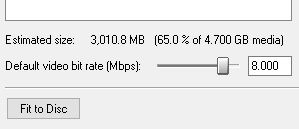
If I render a video file for DVD at a bit rate higher than 8.000, does DVD Architect then compress the file to 8.000 as it is burned on the media?
The default value for Blu-ray is 18.000.
Thank you for any insight.
If I render a video file for DVD at a bit rate higher than 8.000, does DVD Architect then compress the file to 8.000 as it is burned on the media?
The default value for Blu-ray is 18.000.
Thank you for any insight.
Last Edit:31 Dec 2020 10:33 by RobWS
Please Log in or Create an account to join the conversation.


If your video files are DVD/Blu-ray compatible then DVDA will use them without recompression (re-rendering). But if they require recompression then the default bitrate value will be used. Also menu creation will be done at the default bitrate.
by ericlnz
The following user(s) said Thank You: DoctorZen
Please Log in or Create an account to join the conversation.

I know this thread is older, but I'd like to comment that even when I create videos using .264 - 1920 X 1080 at 24p and 18k bitrate, DVD Architect V7 still wants to compress them. I don't use Sony Vegas - so maybe compresses anything else?
by IAmDennis
Please Log in or Create an account to join the conversation.
It doesn't matter where the videos come from, if their video and audio streams are compatible with the DVD/Blu-ray specs they won't be recompressed.
- Are you making a DVD or Blu-ray?
- What is your file type(s). If they are mp4 then they aren't compatible and will get recompressed.
- I don't have theBlu-ray specs in front of me so cannot recall if 24p is compatible.
by ericlnz
Please Log in or Create an account to join the conversation.


24p and 23.976p are allowed Frame Rates for 1920x1080 Progressive video in DVD Architect.
25i and 29.97i frame rates are also allowed for 1920x1080 Interlaced video in DVD Architect.
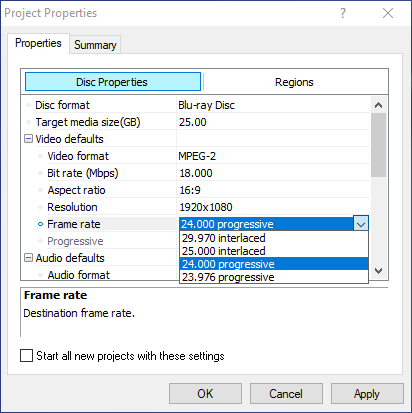
25i and 29.97i frame rates are also allowed for 1920x1080 Interlaced video in DVD Architect.
ℹ️ Remember to turn everything off at least once a week, including your brain, then sit somewhere quiet and just chill out.
Unplugging is the best way to find solutions to your problems. If you would like to share some love, post a customer testimonial or make a donation.
Unplugging is the best way to find solutions to your problems. If you would like to share some love, post a customer testimonial or make a donation.
by DoctorZen
Please Log in or Create an account to join the conversation.
I'm creating Blu-ray discs. The settings I chose:
1920X1080 at 24fps - 18mbps and I use "HD Optimized" H.264 as the file type.The finished files are named MP4. I though H.264 was Blu-ray compatible. DVD Architect appears to support AVC format or MPEG-2 format, and when I look up AVC format, I get this information: Read Me When I look up Blu-ray compatible file format - I got this and a few other links that say H.264 is a variation of MP4 and is compatible with Blu-ray format.
My only "road block" is the 18 hours it usually takes to re-compress 9 videos (two hours total length). That isn't a big deal once, but I tend to create the video file - then look at on a full HD TV - and see little things I missed or couldn't see on my computer screen, so I fix those and it has to run another 18 hours. That gets old. If I could create those video files in a format that DVD Architect likes and won't re-compress, I'd be all set.
Can any of you share what specific file format and specs you know can be used in DVD Architect without the re-compression?
1920X1080 at 24fps - 18mbps and I use "HD Optimized" H.264 as the file type.The finished files are named MP4. I though H.264 was Blu-ray compatible. DVD Architect appears to support AVC format or MPEG-2 format, and when I look up AVC format, I get this information: Read Me When I look up Blu-ray compatible file format - I got this and a few other links that say H.264 is a variation of MP4 and is compatible with Blu-ray format.
My only "road block" is the 18 hours it usually takes to re-compress 9 videos (two hours total length). That isn't a big deal once, but I tend to create the video file - then look at on a full HD TV - and see little things I missed or couldn't see on my computer screen, so I fix those and it has to run another 18 hours. That gets old. If I could create those video files in a format that DVD Architect likes and won't re-compress, I'd be all set.
Can any of you share what specific file format and specs you know can be used in DVD Architect without the re-compression?
Last Edit:16 Jun 2021 23:52 by IAmDennis
Please Log in or Create an account to join the conversation.
There is nothing you can do if you are not using Vegas to render the files.
The size of the file and amount of disc space may also be a factor.
If the file sizes are larger than the total disc capacity, it needs to be re-rendered.
I need to restrict my time on the forum right now, because I'm not getting enough work done and am way behind is my schedule.
Hopefully other members of the forum can help out when needed.
The size of the file and amount of disc space may also be a factor.
If the file sizes are larger than the total disc capacity, it needs to be re-rendered.
I need to restrict my time on the forum right now, because I'm not getting enough work done and am way behind is my schedule.
Hopefully other members of the forum can help out when needed.
ℹ️ Remember to turn everything off at least once a week, including your brain, then sit somewhere quiet and just chill out.
Unplugging is the best way to find solutions to your problems. If you would like to share some love, post a customer testimonial or make a donation.
Unplugging is the best way to find solutions to your problems. If you would like to share some love, post a customer testimonial or make a donation.
by DoctorZen
The following user(s) said Thank You: IAmDennis
Please Log in or Create an account to join the conversation.
MP4 file type is a container. Mpeg-4 is a codec like AVC, H264, which I understand are similar. Whilst the codecs are compatible with Blu-ray specs my understanding from comments made on several forums is that they are not compatible if wrapped in a mp4 container i.e.mp4 file. They need to be in a MPEG transport stream file such as m2ts, mpeg or avc file type. It is the mp4 file type that's your problem, not what's inside.
Whilst Vegas produces separate stream files for DVDA of which avc is the video stream they don't have to be separate streams. I've used Blu-ray m2ts files from other editors and DVDA has accepted the video stream without recompression. Check if your video editor provides render templates for Blu-ray or m2ts files.
Whilst Vegas produces separate stream files for DVDA of which avc is the video stream they don't have to be separate streams. I've used Blu-ray m2ts files from other editors and DVDA has accepted the video stream without recompression. Check if your video editor provides render templates for Blu-ray or m2ts files.
by ericlnz
Please Log in or Create an account to join the conversation.
Thanks for the info. My video editor (Filmora) doesn't offer those export options. I have a license for Sony Vegas Studio? (the cheaper editor of the two from Sony). I don't like working with it for editing - but I can use it to import, then export a file.
The total file size of my project is 12GB before it is loaded into DVDA, so it's not too big for a 25gb Bluray disc.
Thanks-
The total file size of my project is 12GB before it is loaded into DVDA, so it's not too big for a 25gb Bluray disc.
Thanks-
by IAmDennis
Please Log in or Create an account to join the conversation.
What export options does Filmora have? Unfortunately I cannot find anything about its export options on its webpage.
by ericlnz
Please Log in or Create an account to join the conversation.
Forum Access
- Not Allowed: to create new topic.
- Not Allowed: to reply.
- Not Allowed: to edit your message.
Moderators: DoctorZen
Time to create page: 0.858 seconds