DISCLOSURE: Movie Studio Zen is supported by its audience. When you purchase through links on this site, we may earn an affiliate commission.
Apologies for forum Moderator being absent for months
The MSZ Forum moderator (which is me), has been unwell for months. I am slowly getting better and will attempt to reply to all messages as soon as possible. Full message posted here: www.moviestudiozen.com/forum/announcements/3653-explanation-for-moderator-absence-on-the-movie-studio-zen-forum
Movie Studio 13 & 1080p & Blu-ray Discs ?
- Eagle eye.
-
 Offline Topic Author
- Zen Level 4
-

- Posts: 137
- Thank you received: 35
For my sins I have a HXR-NX70p video camera. I couldn't sell it during the first year as it had designed issues with the zoom. Since the mod came out which I installed it has a slower zoom but its still not proportional. One thing it can do is shoot 1080p in the 1920x1080 PS mode. I was hoping that Movie Studio 13 would enable me to get the advantage of being able make a Blu-ray disk in 1080p. I can't see how to do this currently. I am not that highly experienced in video editing as I don't video apart from family & holidays. Can anyone shed some light on this, & would it improve the quality compared to 1080i, cheers. Oh finally can I author it in Architect Studio 5. :whistle:
Last Edit:08 Aug 2014 12:03 by Eagle eye.
Please Log in or Create an account to join the conversation.


Replied by MSZ-Derek on topic Movie Studio 13 & 1080p & Blu-ray Discs ?
Posted 07 Aug 2014 17:52 #562 Have you visited the front page of my website recently ?
I just uploaded a new tutorial about this topic a few days ago, with very detailed instructions.
Please read/watch.
How to Render Video for DVD/Blu-ray with Menus using Sony Movie Studio Platinum
The Blu-ray Specification only supports up to 1080i.
All Blu-rays are like this.
Please also read this in-depth article on Wikipedia which tells you what the specs are.
Halfway down the page it has a table showing all the allowed Output Types.
en.wikipedia.org/wiki/Blu-ray_Disc
ℹ️ Remember to turn everything off at least once a week, including your brain, then sit somewhere quiet and just chill out.
Unplugging is the best way to find solutions to your problems. If you would like to share some love, post a customer testimonial or make a donation.
Unplugging is the best way to find solutions to your problems. If you would like to share some love, post a customer testimonial or make a donation.
Last Edit:25 Sep 2014 00:08 by MSZ-Derek
Please Log in or Create an account to join the conversation.
- Eagle eye.
- Offline Topic Author
- Zen Level 4
-
- Posts: 137
- Thank you received: 35
Replied by Eagle eye. on topic Movie Studio 13 & 1080p & Blu-ray Discs ?
Posted 08 Aug 2014 06:08 #563 Thank-you for your quick and informative reply. I was a tad confused however when I read the first line of your recommended Wikipedia article on Blu-ray. It read "Blu-ray Disc (BD) is a digital optical disc data storage format designed to supersede the DVD format, in that it is capable of storing high-definition video resolution (1080p)." I hope I am not misreading this but it appears that it should support 1080p??
I have a SONY Blu-ray player that boasts a 1080p playing capacity as well. If infact I cannot produce a 1080p disk what is the best use of this setting in the production of a project.
My camera manual also states in the 'record settings' part that 1080i FX is the best quality setting. I can't understand the logic, as many articles I have seen push progressive picture quality as the more desireable??
Last Edit:08 Aug 2014 12:04 by Eagle eye.
Please Log in or Create an account to join the conversation.
Replied by MSZ-Derek on topic Movie Studio 13 & 1080p & Blu-ray Discs ?
Posted 08 Aug 2014 12:03 #564 I thought the exact same thing when I started making Blu-ray discs.
Then I did the research. If you want to be a geek, you need to go back to the specifications which were decided by a committee quite some time ago now.
Sony and every other software company that has disc creation programs, MUST follow the Blu-ray specification.
Technology is changing rapidly - too rapidly. That is what the problem is.
1080i was the official maximum quality setting, because when the specification was written and agreed upon, most people were still using glass tube TVs. The first generations of flat screen TVs could only handle a MAXIMUM signal bandwidth of 1080i through an HDMI cable. Any higher than this would have been too much signal and would not pass through cable. So that is why the software has maximum limit of 1080i.
Of cause things have now changed again - 4K TVs are now being produced.
So I dare say that a new disc format will most likely be released in the next couple of years - maybe sooner.
Yes some of the newest Blu-ray Players can now support above 1080i.
Unfortunately, less and less people are making DVDs and Blu-ray Discs now - so Sony and Adobe have not bothered in making any new changes to their disc creation software.
If you have a couple of 1000 dollars to spare, you can buy Commercial Grade Blu-ray software which will give you the ability to make 1080-30p and 1080-60p Blu-ray.
1080i is the maximum you can produce - this matches your camera, so is perfect.
OR
If your camera can shoot at 1080-24p, record to that instead.
Then you can make Blu-ray discs at 1080-24p - this is what many Hollywood Blu-rays from the shop actually use, because this is the same as the Cinema.
Did you read the section halfway down the Wiki page ?
Here is a screen shot from that section.
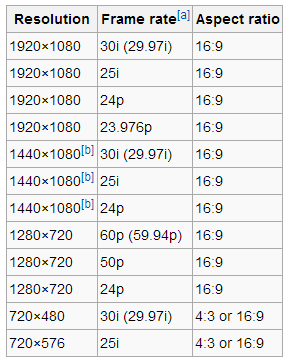
Then I did the research. If you want to be a geek, you need to go back to the specifications which were decided by a committee quite some time ago now.
Sony and every other software company that has disc creation programs, MUST follow the Blu-ray specification.
Technology is changing rapidly - too rapidly. That is what the problem is.
1080i was the official maximum quality setting, because when the specification was written and agreed upon, most people were still using glass tube TVs. The first generations of flat screen TVs could only handle a MAXIMUM signal bandwidth of 1080i through an HDMI cable. Any higher than this would have been too much signal and would not pass through cable. So that is why the software has maximum limit of 1080i.
Of cause things have now changed again - 4K TVs are now being produced.
So I dare say that a new disc format will most likely be released in the next couple of years - maybe sooner.
Yes some of the newest Blu-ray Players can now support above 1080i.
Unfortunately, less and less people are making DVDs and Blu-ray Discs now - so Sony and Adobe have not bothered in making any new changes to their disc creation software.
If you have a couple of 1000 dollars to spare, you can buy Commercial Grade Blu-ray software which will give you the ability to make 1080-30p and 1080-60p Blu-ray.
1080i is the maximum you can produce - this matches your camera, so is perfect.
OR
If your camera can shoot at 1080-24p, record to that instead.
Then you can make Blu-ray discs at 1080-24p - this is what many Hollywood Blu-rays from the shop actually use, because this is the same as the Cinema.
Did you read the section halfway down the Wiki page ?
Here is a screen shot from that section.
ℹ️ Remember to turn everything off at least once a week, including your brain, then sit somewhere quiet and just chill out.
Unplugging is the best way to find solutions to your problems. If you would like to share some love, post a customer testimonial or make a donation.
Unplugging is the best way to find solutions to your problems. If you would like to share some love, post a customer testimonial or make a donation.
Last Edit:08 Aug 2014 12:04 by MSZ-Derek
Please Log in or Create an account to join the conversation.
- Eagle eye.
- Offline Topic Author
- Zen Level 4
-
- Posts: 137
- Thank you received: 35
Replied by Eagle eye. on topic Movie Studio 13 & 1080p & Blu-ray Discs ?
Posted 08 Aug 2014 12:38 #565 Great explanation Doctor Zen all my questions have been satisfied, cheers. I might experiment with 24p a bit, haven't done so before, Thanks. 
by Eagle eye.
The following user(s) said Thank You: MSZ-Derek
Please Log in or Create an account to join the conversation.
Replied by MSZ-Derek on topic Movie Studio 13 & 1080p & Blu-ray Discs ?
Posted 08 Aug 2014 13:16 #566 Cheers
I forgot to mention that I edited the title of your post, so that it describes the content of our discussion more accurately. I'm sure this will help many other people as well.
Just did a quick Google search.
Sony has already announced they are working on the next generation Blu-ray discs.
Capacity will be between 300GB to 1TB (1000GB) !
www.trustedreviews.com/news/sony-and-panasonic-commit-to-blu-ray-replacement-by-2016
ℹ️ Remember to turn everything off at least once a week, including your brain, then sit somewhere quiet and just chill out.
Unplugging is the best way to find solutions to your problems. If you would like to share some love, post a customer testimonial or make a donation.
Unplugging is the best way to find solutions to your problems. If you would like to share some love, post a customer testimonial or make a donation.
by MSZ-Derek
Please Log in or Create an account to join the conversation.
- Eagle eye.
- Offline Topic Author
- Zen Level 4
-
- Posts: 137
- Thank you received: 35
Replied by Eagle eye. on topic Movie Studio 13 & 1080p & Blu-ray Discs ?
Posted 08 Aug 2014 14:01 #568 Thanks for letting me know, the titles fine. 4K looks like being a continuing cost 'merry go round' new blue ray burner, new blue ray player, new TV, new camera, more CPU power the list goes on. 'Stop the world I want to get off' as someone once said!
by Eagle eye.
Please Log in or Create an account to join the conversation.
Forum Access
- Not Allowed: to create new topic.
- Not Allowed: to reply.
- Not Allowed: to edit your message.
Moderators: MSZ-Derek
Time to create page: 0.547 seconds