DISCLOSURE: Movie Studio Zen is supported by its audience. When you purchase through links on this site, we may earn an affiliate commission.
Solved Changing text box attributes


I'm making a sing-along song video and I need to use about 50 text boxes.
I need each of them to be size 40 font, with gabriola text, and positioned bottom center.
I can't seem do that on all 50 at once. I have to set each one individually.
I tried copying one and then pasting in the rest, but then when I change one box's text, it changes all 40 boxes to those same words. Literally ALL ATTRIBUTES are copied, even the words. Change any one thing in one text box, you change them all.
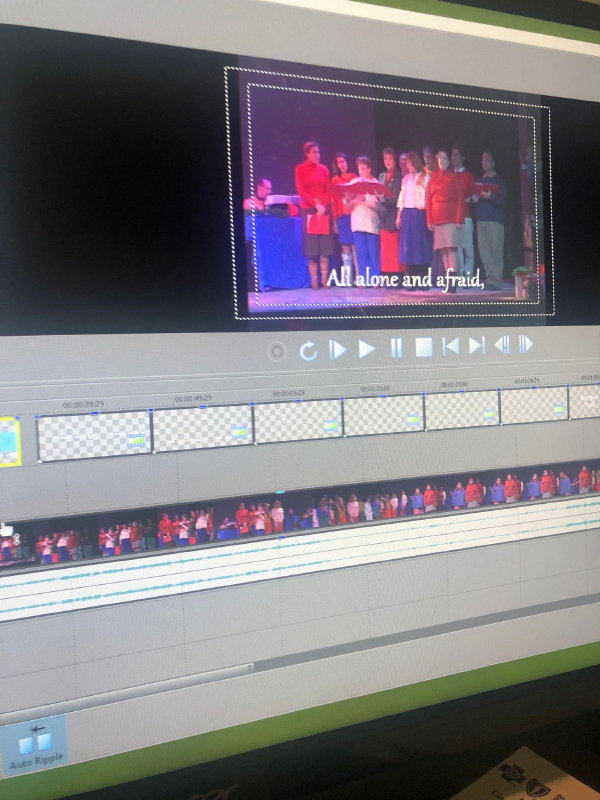
Here is a photo. All those boxes on the top row are going to be words to the sing-a-long. Do I have to edit the font and placement on each one, one at a time? Ugh how time consuming. It would be REALLY terrible if I wanted the words to be in a position that is not one of the presets, but fortunately the center-bottom setting works for me.
(Note: I see this was asked previously in these forums but that was in 2015...and no one answered it.)
I need each of them to be size 40 font, with gabriola text, and positioned bottom center.
I can't seem do that on all 50 at once. I have to set each one individually.
I tried copying one and then pasting in the rest, but then when I change one box's text, it changes all 40 boxes to those same words. Literally ALL ATTRIBUTES are copied, even the words. Change any one thing in one text box, you change them all.
Here is a photo. All those boxes on the top row are going to be words to the sing-a-long. Do I have to edit the font and placement on each one, one at a time? Ugh how time consuming. It would be REALLY terrible if I wanted the words to be in a position that is not one of the presets, but fortunately the center-bottom setting works for me.
(Note: I see this was asked previously in these forums but that was in 2015...and no one answered it.)
Last Edit:08 Dec 2021 17:36 by JamesK
Please Log in or Create an account to join the conversation.


Hi JamesK
It looks like from your screen shot, that you are using Vegas Movie Studio Platinum 13.
There are actually 2x ways you can copy/clone a Text Media Event.
1. Obviously you set up your very first Text Event, with the size, colour, font and position of the text.
2. Hold down the CTRL button and drag the FIRST EVENT, to create a copy of the Text.
3. However, when you let go of the mouse button, a pop-up box will appear that gives you 2 options.
3a. The option you want to select is the first one, which says: Create a New Copy of the Source Media
This option copies everything, but allows you to edit the text without changing the original copy. This is the option you need to select each time.
3b. If you select the 2nd option which says Create a Reference to the Original Media, it creates a linked Cloned version. Anything that changes in one of the clones, affects all other copies.
Regards
Derek
It looks like from your screen shot, that you are using Vegas Movie Studio Platinum 13.
There are actually 2x ways you can copy/clone a Text Media Event.
1. Obviously you set up your very first Text Event, with the size, colour, font and position of the text.
2. Hold down the CTRL button and drag the FIRST EVENT, to create a copy of the Text.
3. However, when you let go of the mouse button, a pop-up box will appear that gives you 2 options.
3a. The option you want to select is the first one, which says: Create a New Copy of the Source Media
This option copies everything, but allows you to edit the text without changing the original copy. This is the option you need to select each time.
3b. If you select the 2nd option which says Create a Reference to the Original Media, it creates a linked Cloned version. Anything that changes in one of the clones, affects all other copies.
Regards
Derek
ℹ️ Remember to turn everything off at least once a week, including your brain, then sit somewhere quiet and just chill out.
Unplugging is the best way to find solutions to your problems. If you would like to share some love, post a customer testimonial or make a donation.
Unplugging is the best way to find solutions to your problems. If you would like to share some love, post a customer testimonial or make a donation.
Last Edit:30 Mar 2022 11:53 by DoctorZen
Please Log in or Create an account to join the conversation.
Forum Access
- Not Allowed: to create new topic.
- Not Allowed: to reply.
- Not Allowed: to edit your message.
Moderators: DoctorZen
Time to create page: 0.800 seconds